UBNT AMO 系列 雙極化全向天線


分類: Ubnt 無線 | 2 則留言

戶外型 UBNT NanoStation M2 NSM2 NS M2 無線網橋 2.4G 300M 無線基站ap

CPU處理器:Atheros MIPS 24KC 400MHz

記憶體:32MB SDRAM8M快閃記憶體

網路介面:(2個10/100乙太網埠

尺寸:294*31*80mm

電源(PoE):24v 0.5A

最大功耗:8W

工作溫度:-30 75°C

NSM2 實測效果(手機1公里距離)


分類: Ubnt 無線 | 1 則留言

CRS125-24G-1S-2HnD-IN 24口 + 300Mbps 無線路由器

Mikrotik 最新產品

CRS125-24G-1S-2HnD-IN 24口 + 300Mbps 無線路由器 (非機架式)

合計24個Gigabit網口+1個SFP光纖插槽

支援switch硬體交換,支援802.1Q VLAN

License level L5授權

每個網口都可當成獨立的網口使用

支援網口隔離功能,24個網口互不干擾 (適合出租套房使用)

Youtube 影片介紹


CRS125-24G-1S-2HnD-IN

Cloud Router Switch is our new Smart Switch series. It is a fully functional Layer 3 switch, and is powered by the familiar RouterOS. All the specific Switch configuration options are available in a special Switch menu, but if you want, ports can be removed from the switch
configuration, and used for routing purposes.

Choose ports for Wire speed switching, or for routing purposes.

What’s more – this device has a built in 2.4GHz wireless access point, this means you can have an AP, a router with any number of ports, and a full wire speed smart switch, all in one device – ideal for medium/small businesses and offices. It has 24 Gigabit ports, one SFP cage, a microUSB port and a built in Wireless AP.

Perfect SOHO gateway router, switch, 11n AP all in one box
• Ethernet, Fiber, or 4G (with optional USB modem) gateway connection to Internet
• RouterOS gateway/firewall/VPN router with passive cooling
• up to twenty-five gigabit switch ports (1xSFP and 24xRJ45)
• 1000mW high power 2.4GHz 11n wireless AP

Product specifications

Details
Product code CRS125-24G-1S-2HnD-IN
SFP DDMI Yes
CPU nominal frequency 600 MHz
CPU core count 1
Architecture MIPS-BE
Size of RAM 128 MB
10/100 Ethernet ports 0
10/100/1000 Ethernet ports 24
MiniPCI slots 0
MiniPCI-e slots 0
Wireless chip model None
Wireless standards 802.11b/g/n
Number of USB ports 1
Power Jack 8-28V DC
Voltage Monitor Yes
CPU temperature monitor No
PCB temperature monitor Yes
Dimensions 285x145x45mm
Operating System RouterOS
Operating temperature range -35C to +65C
License level L5
Antenna gain DBI 4dbi
Current Monitor No
TX power 30dBm
CPU AR9344-DC3A-R
SFP ports 1
USB slot type microUSB type AB
Suggested price $209.00
分類: RouterOS | 1 則留言

RB2011UiAS-2HnD-IN 10網口 300Mbps 無線路由器


合計10個網路接口,其中有五個是Gigabit介面,另外5個是100M介面。

支援switched硬體交換。

ETH1 支援PoE受電。

ETH10 支援電源輸出(500mA)。

新的Atheros 600MHz 74K MIPS網路處理器,128MB記憶體和RouterOS L4授權。

無線的規格為802.11b/g/n 300Mbps


RB2011UiAS-2HnD-IN

The RB2011 is a low cost multi port device series. Designed for indoor use, and available in many different cases, with a multitude of options.

The RB2011 is powered by RouterOS, a fully featured routing operating system which has been continuously improved for fifteen years. Dynamic routing, hotspot, firewall, MPLS, VPN, advanced quality of service, load balancing and bonding, real-time configuration and monitoring – just a few of the vast number of features supported by RouterOS.

RouterBOARD 2011UAS-2HnD has most features and interfaces from all our Wireless routers. It’s powered by the new Atheros 600MHz 74K MIPS network processor, has 128MB RAM, five Gigabit LAN ports, five Fast Ethernet LAN ports and SFP cage (SFP module not included!). Also, it features powerful 1000mW dual chain 2.4Ghz (2192-2732MHz depending on country regulations) 802.11bgn wireless AP, RJ45 serial port, microUSB port and RouterOS L5 license, as well as desktop case with power supply, two 4dBi Omni antennas and LCD panel- all this for only $129!

Tested and recommended to use with MikroTik SFP modules: S-85DLC05D, S-31DLC20D and S-35/53LC20D (not included)

RouterBOARD 2011UAS-2HnD-IN comes with desktop enclosure, LCD panel and power supply.

Wall mount kit (product code RBWMK) for network closet is available for purchase as an optional accessory.

Product specifications

Details
Product code RB2011UiAS-2HnD-IN
SFP DDMI Yes
CPU nominal frequency 600 MHz
CPU core count 1
Size of RAM 128 MB
10/100 Ethernet ports 5
10/100/1000 Ethernet ports 5
MiniPCI slots 0
MiniPCI-e slots 0
Wireless chip model AR9344-DC3A
Wireless standards 802.11b/g/n
Number of USB ports 1
Power Jack 8-28V DC
802.3af support No
PoE 8-28V DC on Ether1
Voltage Monitor Yes
CPU temperature monitor No
PCB temperature monitor Yes
Dimensions 214mm x 86mm for PCB
Operating System RouterOS
Operating temperature range -35C to +65C
License level L5
Antenna gain DBI 4dbi
Current Monitor No
TX power 30dBm
CPU AR9344-DC3A
Max Power consumption 11W
SFP ports 1
USB slot type microUSB type AB
Number of chains 2

這是配件

分類: RouterOS | 1 則留言

如何重新安装MikroTik路由器的OS (Netinstall)

會出現這種情形的話,可能是開機系統損毀.

或是你的原廠路由器密碼忘了而且無法重置.
這時只要重新安裝RouterOS系統軟體即可.

這裡以RB450G為範例(其他RB或CCR型號操作方式也都差不多) , 方式如下……

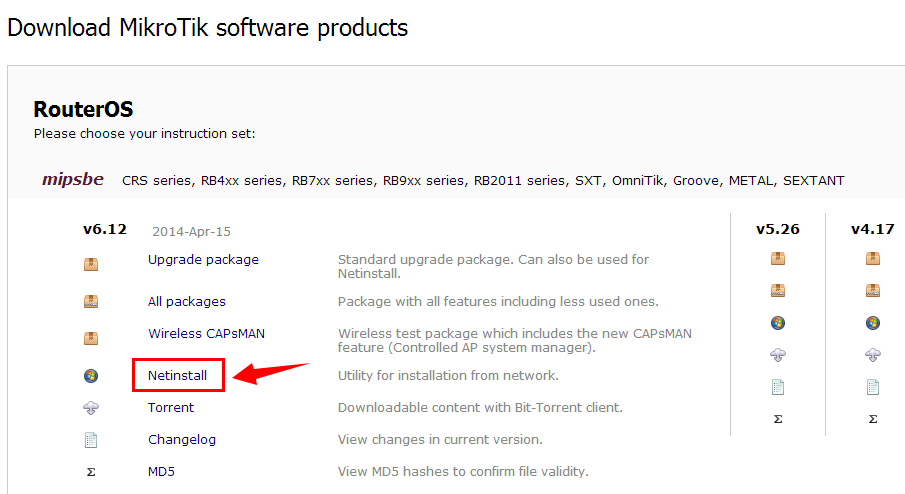
先至官網下載Netinstall 軟體(免安裝)

https://www.mikrotik.com/download

接下來先把您電腦的防毒跟防火牆全部關閉(不關的話可能會造成Netinstall 抓不到RB450G

1.用一條普通網路線,一端接電腦,另一端接RB450G ETH1.

2.把電腦網卡設192.168.88.xxx (xxx 不要1即可,1是 RB450G 要用的).

3.把電腦Netinstall這個 軟體打開.

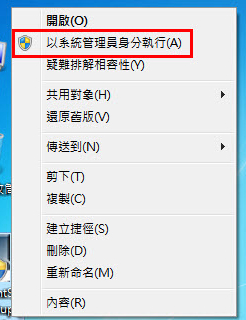
(切記滑鼠移到Netinstall上面之後按右鍵以系統管理員身分執行).

20161023220358

4.先將RB450G斷電,然後壓著機器側邊的RESET按鈕不放+送電.(如下圖)

5. RESET按鈕 持續壓著,一直到 Netinstall  這軟體抓到RB450G後可以放掉.(如下圖)依軟體操做方式重新安裝routeros 系統即可.

https://www.mikrotik.com/download(這是安裝的全部功能模組)

分類: RouterOS | 5 則留言

機器的設定檔如何備份與還原

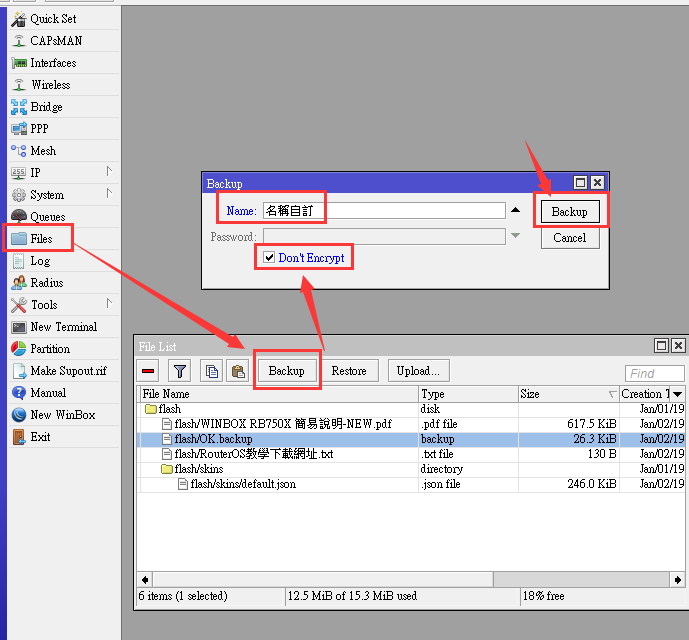
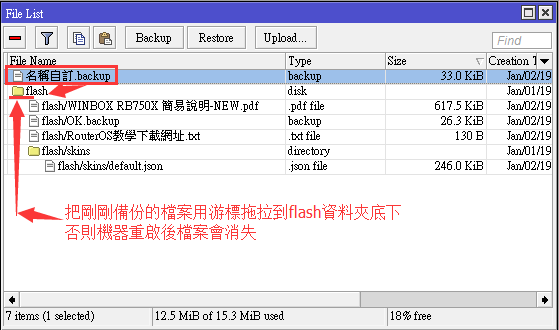
因為太簡單,請看圖操作即可.

↓如何備份↓


 ↓如何還原出貨設定值↓

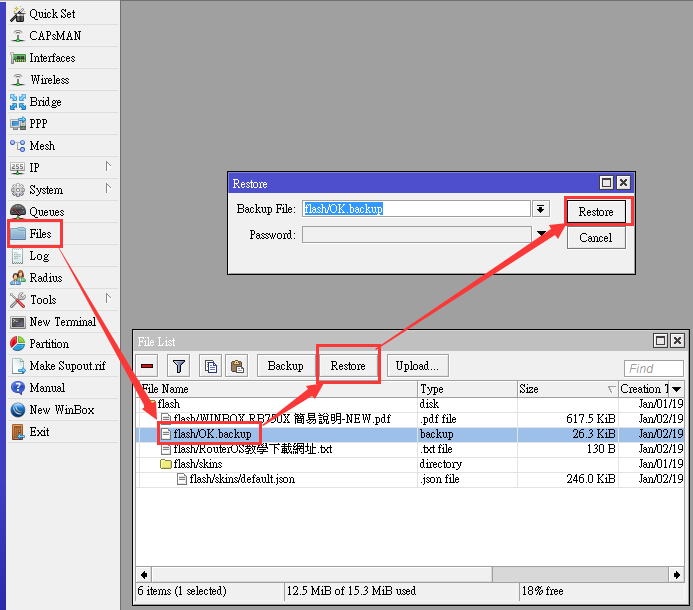
還原方式如下圖,     xxx.backup 的檔案就是機器的設定備份檔

1.先用游標點選該備份檔使文件反白.

2.按 下Restore按鈕即可回復機器的設定值.(出貨時的備份檔沒有設密碼)

如果操作出現失敗,可能是密碼問題,可以先還原成出廠值後再做一次還原成出貨時的設定值
如何還原成出廠值


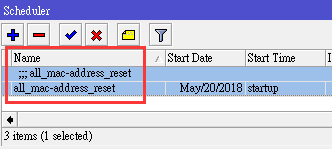
另外,因為可能會有人把備份檔還原到其他機器,這樣會造成二台機器網口的mac-address都一樣,

因此有設定還原之後,每次開機後60秒都會自動重置所有的網口mac-address還原成出廠的原始值,以避免mac-address一樣造成衝突.

如果你不需要用到,可以自行刪除或關閉,如下圖.
 

如何重置mac-address

分類: RouterOS | 1 則留言

RB系列恢復出廠值方法 (RB450G RB850G RB750 RB951 RB751)

RB450G  RB850G  RESET方法

準備工具 金屬筆芯得原子筆一支

先拆機殼

如下圖,步驟如下

1.先拔掉電源.

2.用原子筆芯插進去.

3.插上電源(原子筆芯持續插著)

4.維持1秒即可完成.

5.短路點可能會接觸不良,可以重覆多做幾次.

6.因為RB450G  RB850G 外殼為鋁的材質,螺絲鎖回去時請記得輕一點,太用力會容易脫牙.


RB75x 系列的RESET方法

步驟如下

1.先拔掉電源.

2.把機器底部的塑膠墊拆掉,裡面會有一個洞. 然後用用原子筆芯插進去.

3.插上電源(原子筆芯持續插著)

4.維持1秒即可完成.

5.短路點可能會接觸不良,可以重覆多做幾次.

另一種作法是從側邊的reset按鈕持續壓著(要壓許久), 建議用短路的快速直接.


RB2011系列的RESET方法

步驟如下

1.先拔掉電源.

2.機器底部有一個洞(如底下照片), 然後用用原子筆芯插進去.

3.插上電源(原子筆芯持續插著)

4.維持1秒即可完成.

5.短路點可能會接觸不良,可以重覆多做幾次.

分類: RouterOS | 1 則留言

維基解密…..免加硬件解決電信鎖MAC無法多撥的辦法

某些地方的ISP線路可以一條線路PPPOE多次並取得不同的IP,但是它會限制同一個MAC號不可以重複撥號,否則第二次撥號後會造成第一次PPPOE已撥號的線路斷掉。

其實這個功能ROS 3.x以後就支持了,但是2.9x就很抱歉了。

接下來就看圖吧………
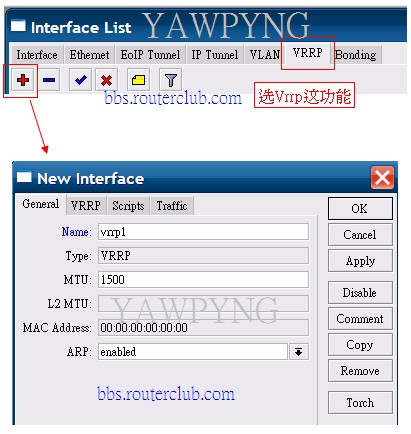
剩下的請移駕論壇瀏覽

bbs.routerclub.com


分類: RouterOS | 3 則留言

傷心都教授

分類: 其它 | 發佈留言

RouterOS 支援的硬體


This page should be edited by the user community to reflect their tested hardware and version used.

See also: Device driver list in manual

Contents

[hide]

Terminals

Vendor↓ Model↓ ROS version ↓ Result ↓
HP t5510 > 5.x Works OK. Boot from CF card connected to PATA (small, notebook). USB, COM and ethernet works. In routing ~40 Mb/s. PCI not tested, but should works.

Motherboards

Vendor ↓ Model ↓ ROS version↓ Result ↓
Asrock Intel 82801G chipset 3.0-3.14 Bad performance, locks up under heavy load, supports multi cpu, PATA not supported, integrated ethernet not recognized. Maybe it’s just Asrock bad motherboard don’t know if the problem is in intel 82801G chipset tested on 2 motherboards, never tested on 2.9.x
ASUS P8H67-V (Intel® H67(B3), 3xPCI, 4xPCI-E) 5.XX Don’t work. “Kernel Panic”. Mikrotik has not driver compatibility with this motherboard.
ASUS  P5B-Deluxe (Intel P965, 3xPCI, 3xPCI-E) 3.13 Works fine on Intel Core 2 Duo E6400. Not supported PATA controller. Both integrated Gigabit NIC (Marvell Yukon 88E8056 & 88E8001) works fine but only at 100Mbps.
ASUS P5B-V (Intel P965, 3xPCI, 4xPCI-E) 3.13 Works fine on Intel Dual Core E2180. Not supported PATA controller. Integrated Gigabit NIC Marvell Yukon 88E8001 works fine but only at 100Mbps. Winbox via MAC = problem, disconnects after 3 seconds. Winbox via IP no problem.
ASUS P5KC (Intel P35, 3x PCI, 3xPCI-E) 3.10 Not supported PATA controller (JMicron JMB363), ROS can boot from USB flash drive; internal ethernet not recognized.
ASUS P5GC-MX/1333 (2x PCI) 3.7 Works great for pentium dual-core e2160, hdd pata and sata, 1,5gb ram dual channel mode, except the attansic l2 ethernet onboard card is not recognized.
ASUS P5GC (6xPCI) 2.9.39 Ethernet recognized but not working
ASUS P7P55D PRO 4.5 Works ok, PATA controller (JMicron JM363) and internal Ethernet successfully recognized.
ASUS P6T SE 4.0 RouterOS boots and works with SATA disk set to ‘IDE compatibility mode’.
ASUS A7V133-C 3.0 beta 7 Works fine
ASUS A7V600-X 3.25 Works fine
EPoX EP-4VKMI 3.16 – 3.24 Works fine.
EPoX 8RDA+ 3.6 Work fine including integrated ethernet
Intel D815EGEW 2.9.x Excellent performance under 2.9. Not tested under v3. Onboard Ethernet Works perfectly.
Intel D845GVSRL 3.7, 3.1, 2.9 Very Stable, used for 4 years
Intel  D945GCCRL 2.9.43 & 3.0 beta 5 Ethernet & DoM not recognized
Intel  D945GCLF2 3.23 4 core’s, 2gb ram, 32gb ssd, no problems.
Intel D945GCPE 3.0 beta 9 Work fine including integrated ethernet
Intel  D945GCNL 3.11 Works fine but integrated ethernet (just disable) goes up and down on reboots multi-cpu= yes. shared IRQ for PCI devices, decrease nic performace.
Intel D945GNT 2.9.45 Works fine
Intel DG33FB 3.7 Works fine, Ethernet but not working (IRQ 9), set in BIOS Security/XD Tegnology to disable
Intel DG950 2.9.42 Ethernet not recognized
Intel DG965SWH 3.0 beta 9 Works fine, but only with SATA not IDE
Intel DH67BLB3 5.14 Works Great with i7-2600k processor
Intel DP55WG 4.6 multi-cpu smp works great, onboard NIC not supported by RouterOS 4.6 yet though, must use pci/pci express nics
Intel DQ965GFEKR (D41676) 3.7, 3.4 Works fine on 3.7/3.4 if multi-cpu=no, BUT 3.5-3.7 fail to boot with E4600 processor and multi-cpu=yes
Intel S3210SHLC 4.2 Boot from USB stick. Work fine for my PPPoE server. Up to 1300 users with summary 200Mbit traffic.
Intel D945GZT-M 3.0rc4 Works fine
Chaintech  AADF950 3.0 beta 5 Works fine
Abit KT7E 3.0 beta 7 Works fine
ECS  nForce3-A 3.6 Work fine including integrated ethernet
ECS P4M800PRO-M478 2.9.43 No Apparent Problems, Disabled any unneeded devices in the BIOS
Abit BE6 2.9.43 Works
VIA EPIA-MII12000 2.9.42 Locks up under heavy load across wireless
Supermicro 5015M-MR 2.9.28 Motherboard is PDSMi w dual core
Supermicro PDSBM-LN2+ 2.9.51 & 3.16 http://forum.mikrotik.com/viewtopic.php?f=1&t=28184
Supermicro PDSMi-LN4+ 2.9.51, 3.13, 3.20 Very stable even with dual-cores enabled.
Gigabyte GA-41M-ES2L 3.28 Works fine; CPU Intel Core2 Dual 2.7GHz; 2XRB44GV
Gigabyte GA-6BXS 2.9.43 Works fine
Gigabyte  GA-8I848P-G 3.6 Work fine including integrated ethernet
Gigabyte GA-8ST667 rev. 3.0 3.13 Works fine; CPU Intel Celeron 2,4GHz; Chipset SiS 645DX; 5xPCI;
Gigabyte GA-M720-US3 rev 1.0 4.6 Works fine (downvolted to 1.1V)
Gigabyte GA-MA790GP-UD4H 3.30 Works fine
Gigabyte K8-NS-ULTRA 2.9.x-3.7 Excelent work, including both onboard ethernet (100 and 1000 lan)
Gigabyte GA-MA770-DS3 (rev. 2.0) 3.10 Works fine and extreme stable include onboard LAN, IDE DOM can load normally
Chipset P35 (Tested Using Gigabyte GA-P35-DS3L & Abit IP35) 3.7 Work fine but only with SATA, not IDE (Include DOM), bellow v3.7 problem with SATA too
Microsoft  Virtual PC 2007 3.7 Installs and and tries to boot.
VMware Workstation v6.0.3 3.7 Runs Wicked Fast! I have had up to 8 Ethernet interfaces running simultaneously.
VMware ESXi v4 3.30 Select IDE type for virtual disk – works perfectly!
Xen 3.2.1 on Intel C2Q 4.x Installs and runs fine on HVM bootloader using Intel VT technology. Even switches to RouterOS console from Dom0 shell. Ethernet interfaces work perfectly. Do not install xen/kvm RouterOS packages!
DFI AD73 Pro (Chipset VIA KT266A/VT8233ACD) 2.9.x-3.30 Works fine. All 5 PCI’s ocupied with 1 x LAN and 6 x R52H’s (3 in RouterBoard11 and 3 in RouterBoard14!)
DFI AK75-EC (Chipset VIA KT133A/686B) 3.14-3.30 Stable. All PCI’s ocupied with LAN, miniPCI-PCI adapters fitted with R5H/R52H’s and XR5’s
Fujitsu Siemens Primergy RX100S5 3.1, 3.7, 3.22 Can Install from Netinstall with RAID (LSI) Controller enable. Can’t install from CD and Netinstall with only SATA or PATA mode. But NOT RUN
MSI 785GM-E51 4.11 Works fine, booted from USB stick, integrated LAN working

Ethernet chipsets

RouterOS version 5 (Linux 2.6.35):

  • e1000: Intel(R) PRO/1000 Network Driver – version 7.3.21-k6-NAPI
  • e1000e: Intel(R) PRO/1000 Network Driver – 1.0.2-k4
  • igb: Intel(R) Gigabit Ethernet Network Driver – version 2.1.0-k2
  • bnx2: Broadcom NetXtreme II Gigabit Ethernet Driver bnx2 v2.0.15 (May 4, 2010)
  • tg3: c:v3.110 (April 9, 2010)
  • atl1c: version 1.0.0.2-NAPI
  • r8169: Gigabit Ethernet driver 2.3LK-NAPI
  • sky2: driver version 1.28

RouterOS version 6 (Linux 3.3.5):

  • e1000: Intel(R) PRO/1000 Network Driver – version 7.3.21-k8-NAPI
  • e1000e: Intel(R) PRO/1000 Network Driver – 1.5.1-k
  • igb: Intel(R) Gigabit Ethernet Network Driver – version 3.2.10-k
  • bnx2: Broadcom NetXtreme II Gigabit Ethernet Driver bnx2 v2.2.1 (Dec 18, 2011)
  • tg3: c:v3.122 (December 7, 2011)
  • atl1c: version 1.0.0.2-NAPI
  • r8169: Gigabit Ethernet driver 2.3LK-NAPI
  • sky2: driver version 1.30
Icon-note.png

Note: Not all ethernet chipset drivers from the Linux kernel are listed.


Vendor ↓ Model ↓ ROS version↓ Result ↓
3Com 3c905B Cyclone 100BaseTX 2.9.51 Works! Extremely reliable, doesn’t fully support tagged vlans
3Com 3cSOHO100-TX [Hurricane] (rev: 48) 3.14rc1 Works
3Com 3c905C-TX/TX-M [Tornado] (rev: 120) 2.9.51 Works! Extremely reliable, doesn’t fully support tagged vlans
3Com  3c905C-TX/TX-M [Tornado] (rev: 116) 2.9.51 Works! Extremely reliable, doesn’t fully support tagged vlans
3Com 3c905B-FX Fast Etherlink XL FX 100baseFx [Cyclone] (rev: 0) 2.9.43 Works but no link in Winbox and no Graph in Dude !!!!
Adaptec ANA-6944A/TX Quad 10/100MBit >=3.20 Works
Compaq NC3122 Fast Ethernet Server Adapter 3.30 recognized but not working
Intel S82557 10/100MBit 2.9.43 works
Intel PWLA8391GT PRO1000/GT 3.7, 3.1, 2.9 Extremely Stable, used for years
Intel PWLA8391GTL PRO1000/GT 3.4 Extremely Stable, used for years
Intel 82575EB & 8257GB 3.15 Added support
Intel 82576 Gigabit ET Quad port 4.5 Not recognized
Intel 82576 Gigabit Dual Port (e1g42et) 5.8 Works
Intel 82572EI (EXPI9300PTBLK) 4.5, 4.6 Works
Intel 82572GI (EXPI9400PTBLK) 4.5, 5.14 Works
Intel 82574L (EXPI9301CT) 5.14 Supported in ROS 5 / Works
Intel 82571EB (EXPI9404PT) QUAD COPPER 4.6, 5.14 Works
Intel S82557/S82555 10/100 Mbit TX 2.9.50 / 3.16 Works Stable! FCC ID:EJMNPDSPD035
Intel PRO 1000 MT 2.9.51 Works
Intel 82541GI/PI Gigabit Ethernet Controller (rev: 5) 2.9.49 Working but with high traffic (>100M) and many packets makes drops
Intel 10Gbit Ethernet PCI Express 3.17 Works
Intel 82557/8/9 Ethernet Pro 100 (rev: 5)/Dual ports(Two ports/2-port)/RJ-45″ 4.10 Works, fine!
Intel 82599ES – Intel X520 series adapters 5.x & 6.x Works, fine! Note: has SFP transceiver vendor restrictions:http://www.intel.com/support/network/adapter/pro100/sb/CS-030612.htm
D-Link DFE-528TX rev. E1 3.13 Works
D-Link DFE-580TX 4-port 3.0 beta 5 Bad card, not recommended. Hangs router
D-Link DFE-530/538TX 2.9.43 – 3.x Works well, no apparent problems.
D-Link DUB-E100 USB 3.18 added support, reported to be working
Marvell 88E8001 Gigabit Ethernet Controller (rev: 20) 3.13 Works
Marvell 88E8056 3.6 reported to be working with some BIOS setting enabled
DECchip 21143 (ZYNX ZX410 4-port cPCI) 2.9.51 Working
Realtek RTL-8169 Gigabit Ethernet x4 (rev: 16) 3.0-3.11 Working Extremely reliable, used 4 mounts
Realtek RTL8111 (10/100/1000Mbit) 3.10 Seems to be working only in older RouterOS v3 releases, v3.10 and before.
Realtek RTL8111C, RTL8111DL (10/100/1000Mbit) 4.6 – 4.11 Working
Realtek RTL8139C+ 3.14 Works
Realtek RTL8139D 3.x Some work, others don’t. Check for yourself.
Realtek RTL-8139/8139C/8139C+ (rev: 16) 4.9 & 4.10 Works, fine!
Realtek RTL-8029(AS) (rev: 0)” 4.9 & 4.10 Works, fine!
StarTech ST10000SPEX4 – 4 Port PCIe Gigabit Ethernet Network Card 6.7 Works, great!
ZNYX ZX346Q 3.27 Works
VIA VT6102 [Rhine-II] (rev: 67)” 4.9 & 4.10 Works, fine!

x86 Systems

Model ↓ ROS version ↓ Result ↓
Dell Optiplex GX1 2.9.x-3.0 Intel onboard/cpu 450-600Mhz, eth:3com, best for wirless stations; uptime over 200d, no problems at all.
Compaq Presario 2282 2.9.43 With 3c905 [Boomerang], no apparent problems
Dell GX100 2.9.x – 3.7 Intel onboard, 2 free pci, Intel cpu
Dell GX240 2.9.x – 3.7 Intel onboard, 2 free pci, Intel cpu, IDE HDD.
Dell GX260 2.9.x – 3.7 Intel onboard, 2 free pci, Intel cpu, IDE HDD.
Dell GX270 2.9.x – 3.7 Intel onboard, 2 free pci, Intel cpu. IDE HDD.
Dell GX280 2.9.x – 3.7 Intel onboard, 2 free pci, Intel cpu, SATA HDD.
Dell Dimension XPS GEN 3 2.9.x Lan Onboard, 4 free pci, Intel cpu , SATA HDD ( Excellent Stability )
Dell Inspiron Desktop 518 2.9.x – 3.7 After netinsall stuck on “loading system”
Dell PowerEdge 860 3.x 1U Rackmount, 2x Broadcom Gigabit onboard, 1x Intel CPU (many options), 1 PCI/1 PCIe or 2 PCIe riser options, SATA HDD ONLY. (some issues with floppy netinstall)
Dell PowerEdge R200 >= 3.19 recommended Severe stability and clock issues with non-current ROS. Works like a top on 3.19 though. Also, if using an SATA-to-CF converter, the license key for the CF card in an R200 will only transfer to other R200’s without Mikrotik reissuing it.
Dell PowerEdge R210 5.1 – 5.6 1U Rackmount. Half-depth (39cm) chassis. Dual port on-board Broadcom 5716 Gigabit Ethernet controllers. Single CPU on Intel 3420 Motherboard Chipset. Works OK and stable, once installed. Some issues with NetInstall – PXE boot works OK but install can’t continue (says waiting for drivers…). Tested with Intel Gigabit ET Quad Port Server Adapter – works perfectly.- With Processador Intel E3-1220 and Broadcom NetXtreme II 5709 Gigabit NIC w/TOE & iSOE,Quad Port, Copper, PCIe-4 works fine.
Dell PowerEdge R310 5.0rc7 1U Rackmount. 2 x on-board Broadcom 5716 Gigabit Ethernet controllers. Single CPU on Intel 3420 Motherboard Chipset. Works OK and stable, once installed. Some issues with NetInstall – PXE boot works OK but install can’t continue (says waiting for drivers…). Tested with Intel Gigabit ET Quad Port Server Adapter – works perfectly.
Dell PowerEdge 2950 3.x 2U Rackmount, Optional Redundant Power Supplies, 2x Broadcom Gigabit onboard, 2x Intel CPU (many options), 2- 8xPCIe & 1- 4xPCIe Standard (other risers available), SATA HDD ONLY, 2x internal USB – MUST SPECIAL ORDER WITHOUT RAID CONTROLLER. (some issues with floppy netinstall)}
HP Proliant DL380 G5 3.17 Works, but only if installed from CDROM (Netinstall to Windows mounted HDD causes issues)
HP Proliant ML110 G7 5.20 Works, installed from CD-ROM
Asus EEE PC 701 3.x SFF Laptop, 1×10/100 ethernet (Not detected), Stock Wireless unsupported (AR5007E In Mini-PCIX slot), 630/900Mhz processor, 512MB RAM, 4GB SSD (Not detected), USB2.0 Bootable, SDHC Reader functions as a USB Stick
Dell PowerEdge SC1425 3.x Rackmount, Intel Xeon 2.8 1MB 800FSB, 1024MB DDR2 PC3200 ECC, 2x Intel 82541GI Gigabit Ethernet, HD150gb SATA, USB works, very stable
Fujitsu Siemens Primergy RX100S5 3.7, 3.22 Can Install from Netinstall with RAID (LSI) Controller enable. Can’t install from CD and Netinstall with only SATA or PATA mode. But NOT RUN
Toshiba Magnia SG20 2.9.44 CPU Celeron, VIA chipsets, onboard LAN Realtek and Intel, IDE HDD, PCMCIA tested with Orinoco Silver, miniPCI LT WinModem not work
Advantech FWA-3800 4.11, 4.17, 5.14 CPU Intel Core2 Duo 2,93GHz, 2GB RAM DDR2, 6 x Intel 1Gbps PCIe NIC, 1U size, works good as a BGP router. If you have troubles with MT 5.x on it, try to reset BIOS (by battery remove). Enable ACPI in the BIOS. It is disabled by default in Power Management Setup menu. Without this system does not boot (MT 5.x).
SuperMicro SYS-5015A-EHF-D525 5.18 CPU Intel Atom D525, 2x Intel 82574L 10/100/1000 Ethernet

Embedded Controllers

Model ↓ ROS version ↓ Result ↓
WRAP.1E-2 2.9.51, 3.7 3 Ethernet, 1 miniPCI, 128 MB – Working
WRAP.2E 2.9.51, 3.7, 3.9, 3.10 1 Ethernet, 2 MiniPCI, 128 MB – Work fine
ALIX 2-2 2.9.48 2 Ethernet, 2 miniPCI – Working
Adlink cPCI-6770 Low Power Pentium III 2.9 and 3.0 CompactPCI CPU Module – Working, excellent performance!
Advantech PCA-6751 2.9.49 Working
Soekris 4801-50 2.9.48 3 Ethernet, 128MB, CF 512MB – Working
Soekris 4826-48 3.10 233 Mhz CPU, 128 Mbyte SDRAM, 1 Ethernet, 1 Serial, 256 Mbyte CF Flash, 2 Mini-PCI sockets, PoE. Limited power available/runs only 1 high power card (@26dB) along with another lower power card (@17dB)
Soekris net4801-48/50 + lan1641 3.22 All 7 (3+4) ethernet works, USB works (tested with Huawei 3G modem), extra serial port works. And RouterOS installed on CF card.
ALIX 2C0 2.9,3.0 2 Ethernet, 2 miniPCI ,128Mb 433Mhz Amd Geode- Working Perfect
ALIX 2C1 2.9,3.0 2 Ethernet, 2 miniPCI ,128Mb 433Mhz Amd Geode- Working Perfect
ALIX 2C3 2.9,3.0 2 Ethernet, 2 miniPCI ,256Mb 500Mhz Amd Geode- Working Perfect
ALIX 3C1 2.9,3.0 2 Ethernet, 2 miniPCI ,128Mb 433Mhz Amd Geode- Working Perfect
ALIX 3C2 2.9,3.0 2 Ethernet, 2 miniPCI ,256Mb 500Mhz Amd Geode- Working Perfect
ALIX 2D13 5.2 3 Ethernet, 1 miniPCI ,256Mb 500Mhz Amd Geode- Working Perfect

3G cards

Vendor ↓ Model ↓ Tested RouterOS version ↓ Comments ↓ Format ↓
AirPrime/Sierra PC 5220! v3.x and higher PCMCIA
Alcatel One Touch X020X USB(aka Longcheer WM66; Nuton NT36HD; MWalker mbd 100hu; Novacom GNS-3.5G White, SU-8200U; MTE MW610?) v5.10 and higher Config likeOption_Globetrotter_HSDPA_USB_ModemConnected to Internet, Did not test Speed + Reliability (Alcatel OT X020X on x86) (data 0, info channel: 2) USB
AnyData ADU-E100A(aka “USB Wireless HSDPA/UMTS 2.1GHz GSM/GPRS/EGPRS 900/17000MHz/CDMA 1x EVDO Rev.A”) v3.x and higher USB
AnyData ADU-500A USB(aka “USB Wireless HSDPA/UMTS 2.1GHz GSM/GPRS/EGPRS 900/1800MHz/CDMA 1x EVDO Rev.A”) v3.x and higher USB
AnyData ADU-E630WH( aka “USB Wireless HSDPA/UMTS 2.1GHz GSM/GPRS/EGPRS 900/17000MHz/CDMA 1x EVDO Rev.A”) v6.x and higher USB
Audiovox PC5220 CDMA Dual Band 1XEV-DO PC Card v3.x and higher PCMCIA
C-motech CNU-680 CDMA 1x EV-DO 450Mhz USB Modem (used by Triatel) [1] v3.x and higher USB
Dell 5520 v3.x and higher MiniPCI-E
Dell Wireless 5530 HSPA v6.1 and higher Data channel 0, Info channel 0, init: AT+CFUN=1 (needs manualy change profile by command AT*ENAP=1,1) MiniPCI-E
Ericsson Ericsson_F3507g_Mobile_Broadband_Module[2] v3.x and higher Set init string AT+CFUN=1, data channel and info channel to 3. MiniPCI-e
Huawei E226 USB modem, v3.x and higher USB
Huawei E220 USB modem, E200BIS [3] v3.x and higher USB
Huawei E169 USB modem (used by Tele2) [4] v3.x and higher USB
Huawei E180 USB modem v3.x and higher USB
Huawei E1553 USB modem v3.x and higher USB
Huawei E1550 [5] v3.x and higher USB
Huawei E1762 USB Modem v5.14 and higher Locks up occasionally on 433UAH. Need to unplug to reset. USB
Huawei E372 (USB) Videotron Canada v5.15 and higher Data channel 0 , Info channel 0, APN ihvm.videotron, Phone = *99# , Dial = ATDT , USB
Siemens M20 v3.x and higher
Huawei E620; v3.x and higher PCMCIA
Kyocera KPC650 v3.x and higher PCMCIA
Nokia CS-17 (USB) v5.0 and higher Data channel=2, info channel=4 USB
Nokia CS-18 (USB) Rogers Canada 5.12 and higher Data channel=1, Info channel =1, APN= internet.com, Phone = *99# , Dial = ATDT , pap , Tested on rb-751 and rb-493 USB
Novatel EU740 v3.x and higher MiniPCI-e
Novatel EU870 [6] v3.x and higher MiniPCI-e
Novatel MIFI 2372 Bell Canada v5.12 and higher Data Channel=0 , Info Channel= 0, APN = pda2.bell.ca , Phone = *99# , Dial = ATDT , pap, Tested on Rb-750UP and RB-493 USB
Novatel EV620 CDMA/EV-DO v3.x and higher MiniPCI-e
Novatel Merlin ES620 / Merlin ES720 / Ovation U720[7] v3.x and higher USB
Novatel Merlin ES620 v3.x and higher
Novatel Merlin S720 (HSDPA) [8] v3.x and higher PCMCIA
Novatel Merlin XU870 HSDPA/3G [9] v3.x and higher ExpressCard
Novatel U720 Wireless CDMA Modem v4.5 and higher USB
Novatel U730 (Wireless HSDPA Modem) [10] v3.x and higher PCMCIA
Novatel Wireless CDMA card v3.x and higher
Option Fusion UMTS Quad-GPRS v3.x and higher PCMCIA
Option Globetrotter HSDPA USB aka Teltonika ModemUSB/H7.2 (U3G150) [11] v3.x and higher USB
Option Globetrotter Probably most of the cards needing the HSO driver on Linux, tested: HSDPA USB (Globetrotter iCon 225 [12] v5.12 Option_Globetrotter_HSDPA_USB_Modemsee Workaround for Globetrotter devices offering no modem interface USB
Option Qualcomm 3G WCDMA Model M00201-10886 (GTM378) [13] v3.x and higher miniPCI-e
Option Qualcomm 3G CDMA Model M00301 (GTM380)[14] v3.x and higher Set data channel and info channel to 3. miniPCI-e
Option Qualcomm 3G CDMA Model M00401 (GTM382)[15] v3.x and higher miniPCI-e
Ericsson 3G F3607gw miniPCI-e v3.x and higher Set data channel and info channel to 2, set init string AT+CFUN=1 miniPCI-e
Sierra Wireless Aircard 595 [16] v3.x and higher PCMCIA
Sierra Wireless Aircard 595U USB Sprint Card [17] v3.x and higher USB
Sierra Wireless USB 306 v5.9 and higher Data & Info Channel 2. For Telecom NZ use APN internet.telecom.co.nz and Phone number *99#
Sierra Wireless USB 308 or AT&T Shockwave [18] v5.0rc11 and higher AT Commands are sent through Data Channel 2 or 3. USB
Sierra Wireless AirCard 312U [19] v5.2 and higher USB
Sierra Wireless AirCard 320U [20] v5.2 and higher USB
Sierra Wireless AirCard 580 [21] v3.x and higher PCMCIA
Sierra Wireless AirCard 595 [22] v3.x and higher PCMCIA
Sierra Wireless AirCard 597E [23] v3.x and higher ExpressCard
Sierra Wireless AirCard 875 [24] v3.x and higher PCMCIA
Sierra Wireless AirCard 880 [25] v3.x and higher PCMCIA
Sierra Wireless AirCard 880 E [26] v3.x and higher ExpressCard
Sierra Wireless AirCard 881 [27] v3.x and higher PCMCIA
Sierra Wireless AirCard 881 E [28] v3.x and higher ExpressCard
Sierra Wireless EM5625 [29] v3.x and higher MiniPCI-e
Sierra Wireless MC5720 [30] v3.x and higher MiniPCI-e
Sierra Wireless MC5725 [31] v3.x and higher MiniPCI-e
Sierra Wireless MC8705 [32] v5.1 and higher MiniPCI-e
Sierra Wireless MC8755 [33] v3.x and higher
Sierra Wireless MC8755 for Europe [34] v3.x and higher MiniPCI-e
Sierra Wireless MC8765 [35] v3.x and higher MiniPCI-e
Sierra Wireless MC8775 [36] v3.x and higher MiniPCI-e
Sierra Wireless MC8780 [37] v3.x and higher MiniPCI-e
Sierra Wireless MC5725 [38] v3.x and higher MiniPCI-e
Sierra Wireless MC5727 [39] v3.x and higher MiniPCI-e
Sierra Wireless MC8785 v3.x and higher MiniPCI-e
Sierra Wireless MC8790 [40] v3.x and higher Few models do not send echo for input commands, modem does not work properly. MiniPCI-e
Sierra Wireless MC8792 [41] v5.2 and higher Info works only in channel 3. Channels 4 and 5 has limited AT set. datachannel=4, infochannel=3 MiniPCI-e
Sierra Wireless MC8781 [42] v3.x and higher MiniPCI-e
Sierra Wireless 598 (Sprint) USB [43] v3.x and higher USB
Sierra Wireless MP3G – EVDO v3.x and higher
Sierra Wireless MP3G – UMTS/HSPA v3.x and higher
Sierra Wireless Compass 885 (USB) [44] v3.x and higher USB
Silicon Labs MobiData GPRS USB Modem v3.x and higher USB
Sprint U301/301U 4G wireless card [45] v4.6 and higher C-MOTECH Co, FW301DOWMX, QUALCOMM Patch 33504–Tested with v4.11 on RB433UAH, Data CH=1 Info CH=3 Phone #777 for Sprint in US USB
Sprint U300/300U 4G wireless card [46] v4.6 and higher C-MOTECH Co, FW301DOWMX, QUALCOMM Patch 33504 USB
Franklin M600 3G/4G wireless card [47] v5.x and higher only 3G mode MiniPCI-e
Verizon Express Network PC5220 (AirPrime 5220) v3.x and higher
ZTE AC8700 v3.x and higher
ZTE MF620 / MF622 [48] v3.x and higher USB
ZTE MF620 / MF622 (3G) [49] v3.x and higher USB
ZTE MF100 [50] v5.11 and higher Set info channel = 1, data channel = 2 USB
ZTE MF680 [51] v5.4 and higher Used by 3 in Sweden. Set data chanel to 1 USB
ZTE MF668 [52] v4.5 and higher for Rogers Wireless (Canada) Set APN: isp.apn and Info & Data Channel to 1 USB
T-Mobile (Germany) Web´n´Walk Box Micro (Huawei E220)[53] v3.x and higher USB
Vodafone (Germany) Easybox 2 (Huawei E220) [54] v3.x and higher USB
Surfbox Mini (Huawei E220) [55] v3.x and higher USB
E-Plus & Base (Germany) USB Minimodem (Huawei E220) [56] v3.x and higher USB
Huawei E600 v3.x and higher PCMCIA
Novatel Merlin V640/XV620 [57] v3.x and higher ExpressCard
Novatel Merlin V620/S620 [58] v3.x and higher PCMCIA
Novatel Merlin EX720/V740/X720 [59] v3.x and higher ExpressCard
Novatel Merlin V720/S720/PC720 [60] v3.x and higher PCMCIA
Novatel Merlin XU870 HSDPA/3G [61] v3.x and higher ExpressCard
Novatel X950D [62] v3.x and higher ExpressCard
Novatel ES620/ES720/U720/USB720 v3.x and higher USB
Novatel E725/E726 [63] v3.x and higher MiniPCI-e
Vodafone EU740/Novatel non-Vodafone EU740 v3.x and higher MiniPCI-e
Vodafone K3565/Huawei E160 [64] v3.x and higher USB
Novatel EU850D/EU860D/EU870D [65] v3.x and higher MiniPCI-e
Novatel MC930D/MC950D [66] v3.x and higher USB
Novatel MC727/U727 [67] v3.x and higher USB
Novatel Expedite EV620 CDMA/EV-DO v3.x and higher MiniPCI-e
Novatel Expedite EU740 HSDPA/3G, Dell Wireless 5500 Mobile/Dell Wireless 5505 Mobile v3.x and higher MiniPCI-e
Novatel Expedite E720 CDMA/EV-DO v3.x and higher MiniPCI-e
Novatel Expedite ET620 CDMA/EV-DO v3.x and higher PCMCIA
Onda H600/ZTE MF330 v3.x and higher
Onda MDC525UP Not supported USB
Onda MT833UP (opt. ext. antenna) v5.6 and higher Set info channel = 1, data channel = 0 USB
Onda MT835UP (opt. ext. antenna) v5.21 and higher Set info channel = 1, data channel = 0 USB
BP3-USB & BP3-EXT HSDPA v3.x and higher USB
ZTE MY 39 (MSM 6500 based) [68] v3.x and higher PCMCIA
Cricket A600 v3.x and higher
Globetrotter HSDPA Modem Option N.V. v3.x and higher
Sony Ericsson MD300 v3.x and higher
ZTE MF 626 [69] v3.x and higher USB
ZTE MF 627 [70] v3.x and higher USB
Pantech / UTStarcom UM175 v3.x and higher USB
Novatel U760 [71] v3.x and higher USB
ZTE K3565-Z [72] v4.4 and higher Revision: BD_P673A2V1.0.0B09 USB
Novatel Expedite EV620 v4.5 and higher MiniPCI-e
Novatel MC760 VMU [73] v4.5 adn higher USB
Franklin Wireless FW300DOWMX v4.5 and higher
Huawei EC1260 v4.5 and higher USB
Vodafone K3520-Z [74] v4.6 and higher USB
Vodafone K3765 [75] v4.6 and higher USB
Telstra 3G Elite v5.x and higher USB
Vodafone Huawei K4505 v5.x and higher Data-channel=0 Info-channel=3 USB
Vertex VW 110 v5.x and higher
ZTE MF112 [76] v5.x and higher Power issues on mipsbe boards USB
Huawei ET127 v5.x and higher 3G
Huawei EC1261 v5.x and higher USB
Huawei E173 [77] v5.x and higher USB
ZTE MF190 [78] v5.x and higher Data channel=3 and info Channel=1 USB
ZTE MF102 [79] v5.x and higher Works! Possible that need to change data channel=2 and info channel=2 USB
Option Globetrotter GT380 v5.x and higher
Simcom 5220 v5.x and higher
Huawei K3770 v5.x and higher
Novatel USB551L (Verizon) [80] v5.9 and higher Only 3G support (No LTE support) UB
Novatel Wireless MIFI4510 Not supported
ZTE MC2718 [81] v5.8 and higher Possible data-channel=0 info-channel=1 GPS(NMEA)=4 MiniPCI-e
LG-VL600 (Verizon) Not supported
Huawei EC156 [82] v5.8 and higher USB
Vodafone K3806 [83] v5.8 and higher USB
ZTE MF-210V [84] v5.9 and higher MiniPCI-e
Huawei E398 [85] v5.9 and higher USB
Huawei E367 v5.11 and higher USB
Huawei EM770 [86] v5.11 and higher MiniPCI-e
Nokia E52 (Series 60) v5.12 and higher Set Usb mode to “PC Suite” in phone menu, Baud rate – 115200, Ports – 0/0, APN – internet, no modem init string, Dial number – *99# USB
Nokia 6700 Classic (Series 40) v5.12 and higher Set Usb mode to “PC Suite” in phone menuBaud rate – 115200 Ports – 0/0 APN – internet Modem init string – ATZ, Dial number – *99#

Phone is charged up through the USB port

USB
Alcatel X220S [87] v5.13 and higher USB
MO835UP v5.14 and higher USB
Nokia Datacard CS-11 & CS-15 v5.14 and higher USB
ZTE MF821 v5.15 and higher USB
Huawei K4510 [88] v5.15 and higher USB
Huawei E173s v5.15 and higher USB
Huawei E352 Supported, if you remove the PIN and change the Data-channel to ‘2’. Info-channel is ‘0’. USB
Option3G Mini-PCI model GTM661W Not supported USB
Option 225 v5.15 and higher USB
ZTE AC682 might not work USB
ZTE AX320 v5.15 and higher USB
ZTE MF 652 v5.15 and higher USB
Vodafone Huawei K-4605 v5.15 and higher USB
Huawei E353 v5.15 and higher Some revisions might not work. USB
CELOT CT-680 v5.16 and higher USB
Huawei / ZTE 669T [89] v5.8 and higher Info/data =1 and 2 worked USB
Huawei / ZTE MF195 [90] v5.18 (maybe 5.17, but 5.16 not worked) Info/data =1 worked USB
Haier CE81B v5.21 USB
Huawei E1731 v5.21 and higher USB
Huawei EM820W [91] v5.11 and higher Data channel=0, Info channel=2, Keep info channel open MiniPCI-e
Alcatel X221L [92] v5.20 and higher USB
Telecom NZ T-Stick ZTE MF-181 v6.0rc13 Data Channel=2, Info Channel=2, APN internet.telecom.co.nz, PHONE=*99#. Tested ok for both data and SMS on CCR1016-12G USB
Huawei MU609 mPCIe [93] v6.0 Data channel=4, Info channel=2, Keep info channel open MiniPCI-e
Huawei ME909u-521 [94] v6.0 Data channel=4, Info channel=2, Keep info channel open MiniPCI-e


* – Currently MikroTik RouterOS works with PPP 3G modems over serial interfaces, 4G modems with IP drivers are not supported.

4G LTE cards

LTE should be configured under the new “/interface lte” menu

Model ↓ Tested RouterOS version ↓ Comments ↓ Format ↓
BandRich C501 [95] v5.25 and v6.0 USB
Sierra Wireless MC7710/MC7700 [96] v5.25 and v6.0 If modem uses firmware 3.5 it should be upgraded to 3.5.23.2 firmware release in order to work in RouterOS correctly again. MiniPCI-e
Sierra Wireless AirCard 320U [97] v6.0 Vendor/product id pair should be 0x0f3d/0x68AA and DirectIP firmware loaded on the modem. USB
Yota LU150 [98] v5.22 and v6.4 Some settings are ignored. Works in Russian markets. USB
Yota WLTUBA-107[99] v6.0 Some settings are ignored. Works in Russian markets. USB
Yota wifi modem[100] v6.7 Some settings are ignored. Works in Russian markets. USB
Vodafone K4305[101] v6.7 Some settings are ignored. USB
Android usb tethering interface v6.7 Some settings are ignored. USB
ZTE MF823 [102] v6.8 Some settings are ignored. USB
Vodafone K4201-Z[103] v6.8 Some settings are ignored. USB
ZTE MF827 [104] v6.8 Some settings are ignored. USB
Huawei E3272 [105] v6.8 Some settings are ignored. USB
Huawei ME609 [106] v6.11 MiniPCI-e
Huawei ME909u-521[107] v6.11 MiniPCI-e

Memory cards

NB! New flash cards need always formatting!

Legend:

  • V – works
  • X – doesn’t work
  • ? – not tested
  • NA – not available for this RB
Model ↓ Type ↓ RB600 ↓ RB1000 ↓ RB433AH ↓ RB450G ↓ R493G ↓
PQI 4GB 120x HiSpeed CF X  ? NA  ?  ?
2GB Transcend 133x CF X  ? NA  ?  ?
2GB Kingston 133x (Elite Pro, code CF/2GB-S2) CF V  ? NA  ?  ?
4GB Kingston 133x (Elite Pro) CF  ? V NA  ?  ?
4GB Kingston CF/4GBIN CF X  ? NA  ?  ?
8GB A-Data Speedy G08GNMC7B0095 CF V V NA  ?  ?
16GB A-Data Speedy CF V V NA  ?  ?
4GB Apacer Photo Steno IV 300X CF X X NA  ?  ?
1GB Sandisk Ultra II BB05024GA CF V V NA  ?  ?
2GB Sandisk Ultra II CF  ? V NA  ?  ?
8GB Sandisk Ultra II CF  ? V NA  ?  ?
8GB SanDisk Extreme III (200X,30MB/s) CF  ? V NA  ?  ?
2.5GB Seagate ST1 (ST625211CF) CF microdrive V V NA  ?  ?
8GB Seagate ST1 CF microdrive V V NA  ?  ?
64MB Nokia microSD NA NA ? V  ?
512MB Kingston microSD NA NA V  ?  ?
1GB Apacer microSD NA NA V  ?  ?
1GB Kingston (SDC/1GB) microSD NA NA  ? X  ?
2GB Kingston microSD NA NA X X  ?
2GB Traxdata microSD NA NA ? V  ?
4GB Apacer SDHC (class 6) microSD NA NA V X  ?
4GB Axiz microSD NA NA V  ?  ?
4GB Kingston microSD NA NA V  ?  ?
4GB Kingston SDHC (C04G JAPAN class 4) microSD NA NA V  ?  ?
4GB Maxell SDHC (class 2) P-series microSD NA NA  ?  ? V
4GB Transcend SDHC microSD NA NA V  ?  ?
4GB Sandisk Mobile Ultra Micro SDHC (with card reader) microSD NA NA  ? V  ?
8GB Sandisk SDHC (0733702482DLE) microSD NA NA V V  ?
8GB Sandisk Mobile microSDHC (SDSDQ-8192-A11M) microSD NA NA  ? V  ?
8GB Sandisk Mobile Ultra SDHC (Class 6) microSD NA NA  ? V  ?
8GB Kingston SDHC (Class 4) microSD NA NA V X  ?
8GB ADATA micro SDHC (AUSDH8GCL6) (Class 6) microSD NA NA  ? V  ?
16GB Sandisk micro SDHC (SDSDQ-16384-P36M) class 2 microSD NA NA NA X  ?
16GB Sandisk micro SDHC (0835B03279DQ) class 2 microSD NA NA V V  ?
2GB Sandisk micro SDHC class 2 microSD NA NA NA X V
4GB Sandisk Mobile microSDHC (SDSDQM-004G-B35S) class 4 microSD NA NA  ? X X
2GB Transcend microSD (TS2GUSD) class not stated microSD NA NA  ? X  ?

Note: Pushing the “Kingston SDHC 8GB card” all the way into the socket caused the card not to work properly! It had to be pulled out ~1mm for it to work!

802.11a/b/g wireless cards

Model ↓ Form factor ↓ Platform ↓ ROS↓ Result ↓
RouterBOARD R52 [108] miniPCI ALL ALL Natively supported!
RouterBOARD R52H [109] miniPCI ALL ALL Natively supported!
TechnicLan TMP-5414A miniPCI All RouterBOARDs 2.9 / 3.x / 4.x Perfect, Stable
CompexWLM54AG-20 miniPCI RB1xx / RB3xx / RB4xx / RB5xx / RB6xx / x86 2.9 / 3.x / 4.x Perfect, Stable
CompexWLM54A-26 miniPCI RB1xx / RB3xx / RB4xx / RB5xx / RB6xx / x86 2.9 / 3.x / 4.x Perfect, Stable
SparkLAN WMIA-165G miniPCI RB1xx / RB3xx / RB4xx / RB5xx / RB6xx / x86 2.9 / 3.x / 4.x Perfect, Stable
SparkLAN WMIA-166AG miniPCI RB1xx / RB3xx / RB4xx / RB5xx / RB6xx / x86 2.9 / 3.x / 4.x Perfect, Stable
SparkLAN WMIA-166AGH miniPCI RB1xx / RB3xx / RB4xx / RB5xx / RB6xx / x86 2.9 / 3.x / 4.x Perfect, Stable
Alfa AWPCI 085 H miniPCI RB1xx/RB333/RB4xx/x86 2.9&3.x All just perfect
TP-Link TL-WN550/551 PCI x86 2.9&3.x Perfect 19dB rated, stable at 21
TP-Link TL-WN650/651 PCI x86 2.9&3.x Perfect 19dB rated, stable at 21. Unstable with compression activated
D-Link AG530 a/b/g (both rev.A1 and A2) PCI x86 2.9&3.x Perfect. Works perfect, in both 2.4 and 5.x GHz
D-Link DWL-G510 PCI x86 only 2.9.x tested Perfect. Tested Rev A1
D-Link DWL-G520 PCI x86 2.9.x & 3.x Works well.
D-Link DWL-G520+A/RaLink 2591 Chipset PCI x86 4.9 NOT Work!
Gigabyte b/g GN-WI01GT miniPCI-e x86 3.x Works also in RouterBOARDs with miniPCI-e slot
Senao NL-2511CD EXT2 PCMCIA x86&rb230 only 2.9x tested Perfect. Just about the most sensitive card i used, in the good sense. Only 11b.
Planet WL-8310 PCI x86 only 2.9.x tested Perfect. Stability.
Netgear WG311T 108 PCI x86 only 2.9x tested Perfect. stability
SMC SMCWPCIT-G PCI x86 3.x tested Perfect on A/B/G.
Wistron DCMA-81 miniPCI x86,rb 2.9.xx, 3.xx Perfect on A/B/G with or without compression.
Wistron DCMA-82 miniPCI rb 3.xx Works on some RB, but on 2/3 of my RB433 it causes the board to reboot when enabled. Many other people have had similar experiences. Not recommended. Maybe OK on 133
Senao NMP-8602 miniPCI x86&rb411 2.9x,3.x tested Perfect on a/b/g
Dbii F20 miniPCI RB411 & RB433 3.x tested Perfect on B/G, too thick for 3 in rb433
Dbii F50 miniPCI RB411 & RB433 3.x tested Perfect on A, too thick for 3 in rb433
Dbii F20-PRO miniPCI RB411 & RB433 3.x tested Perfect on B/G, too thick for 3 in rb433
Dbii F50-PRO miniPCI RB411 & RB433 3.x tested Perfect on A, too thick for 3 in rb433
TP-Link TL-WN751ND] PCI x86 v5.xx, v6.xx Not Working!
TP-Link TL-WN851ND] PCI x86 v5.xx, v6.xx Working
TP-Link TL-WN881ND] PCI-e x86 v5.xx, v6.xx v5.xx NOT working not appear in interfaces, v6.x working (6.1 unstable after scan stop working in client or manual scan, set to AP-bridge mode working ok)
XR2 miniPCI RB433 3.x works
XR5 miniPCI RB433, x86 3.x works
SR9 miniPCI RB433 3.x works
SR9 miniPCI RB411 & RB433 3.x works
ValemountKXS30SG miniPCI RB433 3.2 & 4.2 tested B/G only, no A. Big heat sink means card should be installed on highest mount when other cards being used. High power consumption can cause power problems, otherwise works perfectly.
Zcomax XG-650 miniPCI RB112 & RB433 4.2 & 4.6 Not working (driver doesnt work / exist). It has a TI TNETW1130GVF chipset.
AR5BMB5 miniPCI RB411,x86 3.xx, 4.3 Not working. Atheros chipset.

802.11n wireless cards

Model ↓ Form factor ↓ ROS↓ Result ↓
RouterBOARD R2N miniPCI 4.0b3 works
RouterBOARD R52N miniPCI 4.0b3 works
RouterBOARD R5H miniPCI v4 works
SparkLAN WMIA-198N miniPCI 4x, 5x Works
Compex WLM200N5-23 miniPCI 4.0b3 Works
Compex WLM200NX miniPCI 4.0b3 Works
Dbii F52N-PRO miniPCI 5.1 Works
TP-Link Wireless N (2T2R) miniPCI 4.0b3 Works
Ubiquiti miniPCI 4.0b3 Works

USB wireless cards

Model ↓ Form factor ↓ ROS ↓ Result ↓
802 b/g/n AR9271 USB 5.0rc4 works
802 b/g/n AR9271 Ubiquiti WiFiStation USB 5.8 x86 works on N but causes reboot on G
802 b/g/n AR9271 ALFA AWUS036NHA USB 5.14 x86 works
802 b/g/n AR9170 NETGEAR WN111v2 USB 5.16 x86 Don’t recognize

T1/E1

Model ↓ Form factor ↓ Platform ↓ ROS↓ Result ↓
Farsite FarSync TE1 PCI x86 3.15 supported

Note: Since v3.15 RouterOS doesn’t support any Sync/T1/E1 cards except select Farsite models

GPS

Model ↓ Connection ↓ Platform ↓ ROS↓ Result ↓
EXAMPLE USB x86 3.30 supported

Storage controllers (SAS/SCSI)

Post only tests since RouterOS v5beta5

Brand ↓ Model ↓ Motherboard ↓ RouterOS ↓ Works ↓ Type ↓
HP Smart Array E200i x86 v5rc1 No SCSI
3ware 3w-9xxx x86 v5rc8 Yes SCSI
Areca arcmsr x86 v5rc8 Yes SCSI
Megaraid Megaraid (some Dell servers) x86 v5rc8 Yes SCSI

LCD panels

Brand ↓ Model ↓ Motherboard ↓ RouterOS ↓ Works / Doesn’t ↓
Crystalfontz CFA-633v1.5 x86 v5RC10 Works
Crystalfontz CFA-633v1.3 x86 v5RC7-RC10 Didn’t work

USB storage

Icon-note.png

Note: USB storage device that does not require special drivers or is compatible to work with generic USB storage drivers will work. Devices include external hard drives, USB flash drives


Brand ↓ Model ↓ Works / Doesn’t ↓
generic USB flash drive Works
Kingston DataTraveler 2GB Works

SFP modules

Brand ↓ Model ↓ Rate ↓ Connector/Cable type ↓ Wavelength ↓ Tested with↓ Works / Doesn’t ↓
MikroTik S-85DLC05D 1,25G Dual LC, MM 850 CCR/RB2011 Natively supported
MikroTik S-31DLC20D 1,25G Dual LC, SM 1310 CCR/RB2011 Natively supported
MikroTik S-35LC20D 1,25G LC, SM T1310nm/R1550nm CCR/RB2011 Natively supported
MikroTik S-53LC20D 1,25G LC, SM T1550nm/R1310nm CCR/RB2011 Natively supported
Finisar FCLF-8521-3 10/100/1000 RJ45, Cat6 RB2011LS-IN Works!
Finisar FCLF-8521-3-MD 10/100/1000 RJ45, Cat6 RB2011LS-IN Works!
Finisar FTRJ8519P1BNL-B1 10/100/1000 1.25 Gb/s 1000Base-SX Ethernet & Dual Rate 1.063/2.125 Gb/s Fibre Channel LC, MM 850 RB2011LS-IN Works!
Finisar FTLF8519P2BNL 10/100/1000 1.25 Gb/s 1000Base-SX Ethernet & Dual Rate 1.063/2.125 Gb/s Fibre Channel LC, MM 850 RB2011LS-IN Works!
Unica SFP-1.25G-T 1000M RJ45, Cat6 RB2011LS-IN Works!
Dell FTLX8571D3BCL 1,25G LC, MM 850 RB2011LS-IN Works!
Unica GP-3124-L2CD-C 1,25G LC, MM 1310 RB2011LS-IN Works!
Cisco SFP-10G-LR 10G LC/PC, SM 1310 RB2011LS-IN Works!
Cisco GLC-T 1.25G RJ45, Cat6 RB2011LS-IN Works!
Cisco GLC-SX-MM 1000BASE-SX SFP transceiver module for MMF, 1.25G LC/PC, MM 850 RB2011LS-IN Works!
6COM 6C-SFP-T 10/100/1000 RJ45, Cat6 RB2011LS-IN Works!
6COM 6C-WDM-0210BSD 1,25G Bi-Di SC, SM 1550/1310 RB2011LS-IN Works!
6COM 6C-WDM-0210ASD 1,25G Bi-Di SC, SM 1310/1550 RB2011LS-IN Works!
6COM 6C-SFP-0310D 1,25G LC, MM 1310 RB2011LS-IN Works!
6COM 6C-SFP-0301D 1,25G LC, MM 850 RB2011LS-IN Works!
Ingellen INSP-T(10/100/1000) 10/100/1000 RJ45, Cat6 RB2011LS-IN Works!
Ingellen INSPL-53-BX 1,25G Bi-Di LC, MM 1550/1310 RB2011LS-IN Works!
Ingellen INSPL-35-BX 1,25G Bi-Di LC, MM 1310/1550 RB2011LS-IN Works!
Ingellen INSP -LX-SM 1,25G LC, MM/SM 1310 RB2011LS-IN Works!
Ingellen INSP-SX-MM 1,25G LC, MM 850 RB2011LS-IN Works!
AXCEN AXGT-R1T4-05I1 10/100/1000 RJ45, Cat6 RB2011LS-IN Works!
AXCEN AXGD-37А4-0531 1,25G Bi-Di LC, MM 1550/1310 RB2011LS-IN Works!
AXCEN AXGD-16А4-0531 1,25G Bi-Di LC, MM 1310/1550 RB2011LS-IN Works!
AXCEN AXGD-1354-0531 1,25G LC, MM 1310 RB2011LS-IN Works!
AXCEN AXGD-5854-0511 1,25G LC, MM 850 RB2011LS-IN Works!
TP-Link TL-SM311LS 1,25G LC, SM 1310 RB2011LS-IN Works!
TP-Link TL-SM311LM 1,25G LC, MM 850 CCR1036 12G-4S Works!
OPTIC OPTIC-SFP-3524S-02-SC 1,25G BiDi SC, SM TX1310/RX1550 RB2011UAS-RM, RB260GS Works!
OPTIC OPTIC-SFP-5324S-02-SC 1,25G BiDi SC, SM TX1550/RX1310 RB2011UAS-RM, RB260GS Works!
OPTIC OPTIC-SFP-S1203-L3302-LC 1,25G BiDi LC, SM TX1310/RX1550 RB2011UAS-RM, RB260GS Works!
OPTIC OPTIC-SFP-S1205-L3302-LC 1,25G BiDi LC, SM TX1550/RX1310 RB2011UAS-RM, RB260GS Works!

USB serial adapters

Icon-note.png

Note: when USB serial port is connected RouterOS might attach serial console on the port. Before using it for something else, disable the console on the interface


Brand ↓ Model ↓ Works / Doesn’t ↓
USB U209-000-R Serial-Port Works
FT232RL chipset Works

USB Ethernet

Icon-note.png

Note: see if device works with one of these linux kernel modules. If yes, it will be possible to use it on RouterOS


RouterOS on x86 have these modules enabled

  • USB_PEGASUS
  • USB_RTL8150
  • USB_USBNET
  • USB_NET_AX8817X
  • USB_NET_CDCETHER
  • USB_HSO

RouterOS on mips have these modules enabled:

  • USB_NET_MCS7830
  • USB_NET_AX8817X
  • USB_NET_CDCETHER
  • USB_HSO
  • USB_USBNET

AX88178 (USB2.0 Gigabit Ethernet) recognized but not working.

分類: RouterOS | 1 則留言